

How our queue app works — and why customers stop walking away
QueueAway replaces physical lines with a simple virtual queue. Customers join from their phone, you control the flow, and everyone stays updated automatically. If you want the full product overview, see our queue management system and our dedicated virtual queue app page. If you're operating in the United States, our queue management system for US businesses page explains how these systems are used across industries.
Written by Paul Harnett, founder of QueueAway and ManCave Barbershop Last updated: August 2026
No special hardware. Works on phones, tablets, and desktops. For industry examples, explore: retail, hospitality, and barbershops.

In 60 seconds:
-
1
Customer joins via QR code
Scan, tap a link, or search you in the app.
-
2
Live updates + ETA
They get position and estimated wait time.
-
3
You call the next person
Notify via in-app, SMS, or WhatsApp.
Want the detailed breakdown? Start with Queue Management System then explore your best-fit industry: Retail • Hospitality • Barbershops.
Customers enter your branded Virtual Waiting Room
Once a customer joins your queue, they don't have to stand around wondering what happens next. QueueAway gives them access to a Virtual Waiting Room they can view from their phone while they wait anywhere.
Your waiting room can be customised with useful information about your business, store, event or activation — turning waiting time into part of the customer experience rather than dead time.
- See their live position in the queue
- Follow their estimated waiting time
- Check important information while they wait
- Receive updates when their turn is getting closer
- Leave the physical queue and shop, explore or grab a coffee
- Access branded content and information you choose to display
For retailers, pop-ups and brand activations, the Virtual Waiting Room can also be used to showcase campaign information, product launches, social links, event details or other useful content while customers wait.
“The physical queue disappears — but your brand stays with the customer.”
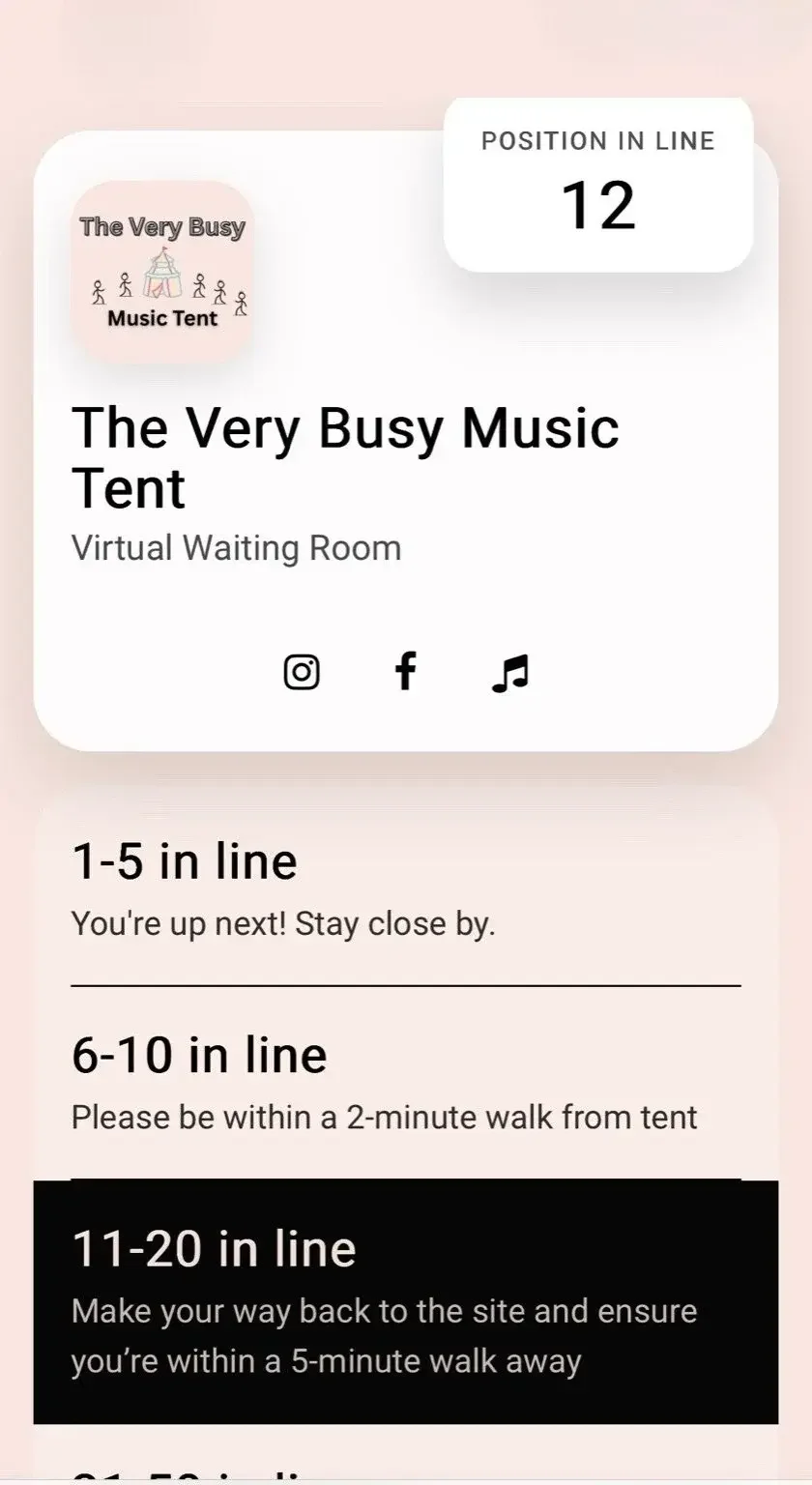
This is what customers see inside your Virtual Waiting Room.
A queue app built for real-world busy days
Whether you run a barbershop, clinic, store, or hospitality venue, QueueAway helps you manage walk-ins and waiting without crowding your space. If you’re comparing solutions, our queue management system page explains features, benefits, and use cases in depth.
-
1
Customers join the virtual queue
Scan a QR code, tap a link, or find you in the app.
-
2
QueueAway keeps them updated
Live position and estimated wait time.
-
3
Staff manage the queue in real time
Move customers forward, notify, and control flow.
Two sides of one simple system
QueueAway works like a modern queue management system: customers get clarity; your team gets control.
For customers
A calm, transparent waiting experience
- Join the queue from a QR code, link, or app search
- See position + estimated wait time
- Get notified when it’s their turn
- Reduce uncertainty (and the urge to leave)
Learn more about the customer experience on our virtual queue app page.
For businesses
Control flow without extra hardware
- Live dashboard to manage the queue
- Add walk-ins, reorder, pause, or remove
- Notify via in-app, SMS, or WhatsApp
- Track demand and peak times with analytics
See the complete feature set in our queue management system overview.
What you can do with QueueAway
Everything you need in a queue app — without the complexity of old-school systems. Want the long-form product overview? Visit Queue Management System.
Virtual check-in
QR code or link-based joining for walk-ins and remote arrivals. Learn more on virtual queue app.
Smart notifications
Automated “you’re next” messages to reduce missed turns.
Walk-in control
Add, reorder, pause, and manage capacity in seconds.
No hardware required
Use devices you already have — phone, tablet, or desktop.
Virtual Waiting Room
Create a branded digital space where customers can follow their queue position, waiting time and useful content while they wait. Explore →
Analytics
Understand demand, peak times, and service performance.
Where a queue management app works best
QueueAway is flexible enough for most in-person service environments. Here are the most common setups (with examples and recommended configurations):
Barbershops & salons
Manage walk-ins, reduce crowding, and keep the chair moving. See recommended setup.
Retail
Handle service desks, peak checkout times, and limited-capacity browsing. Explore retail queue flows.
Hospitality
Reduce lobby congestion and make arrivals feel smoother. See hospitality use cases.
Healthcare
Improve patient flow and reduce waiting room pressure.
FAQ
Is QueueAway easy to set up?
Yes — most businesses can set up in minutes and start with a simple queue, then refine the flow over time. If you want the “big picture” first, read Queue Management System.
What is the Virtual Waiting Room?
Once someone joins your queue, they get access to a branded Virtual Waiting Room they can view from their phone — showing their live position, estimated wait time, and any information you choose to display — so they can wait anywhere instead of standing in line. See it in action on our Virtual Waiting Room page.
Do I need special hardware?
No. QueueAway works on devices you already have (phone, tablet, desktop).
How do customers get notified?
They can receive in-app notifications, plus optional SMS or WhatsApp messages. Learn more about the customer experience at Virtual Queue App.
Is there a contract?
No long contracts — you can cancel anytime depending on your subscription method.
Ready to reduce waiting and keep customers calm?
Start a free trial, or learn more about our complete queue management system. For a deeper dive into the customer side, visit virtual queue app.